
Optimisez votre gameplay Marvel Rivals : un guide complet des paramètres
Marvel Rivals propose des batailles palpitantes et rapides mettant en vedette des héros emblématiques et des visuels époustouflants. Bien qu'ils soient bien optimisés, le réglage fin de vos paramètres peut améliorer considérablement la fluidité et le contrôle du jeu. Ce guide détaille les ajustements des paramètres d'affichage, graphiques et audio pour maximiser le potentiel de votre matériel et libérer le super-héros qui sommeille en vous.
Remarque : Les paramètres non explicitement couverts ici (Liaisons, Accessibilité, Social) sont soumis aux préférences personnelles.
Marvel Rivals : paramètres d'affichage optimaux
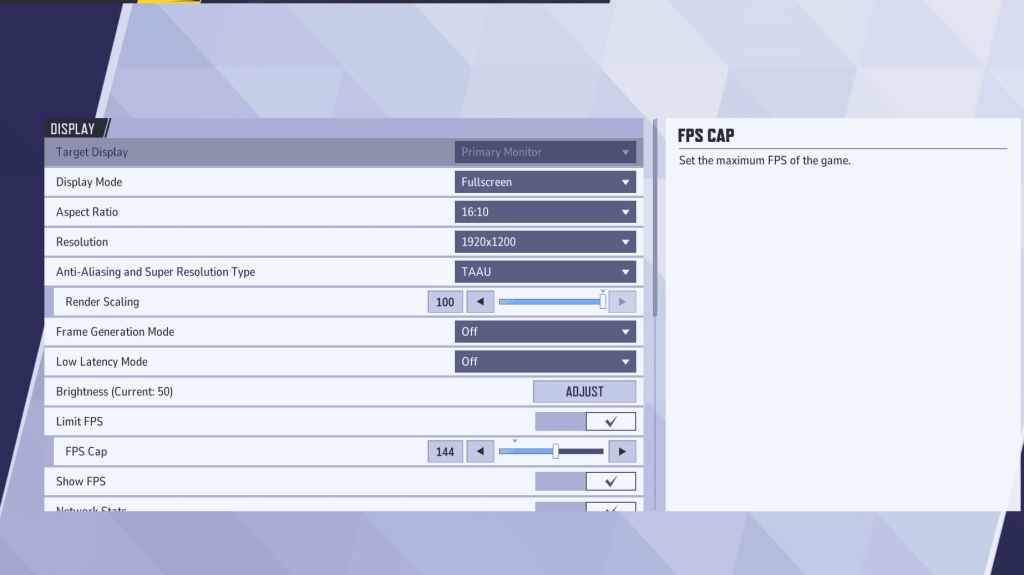
Commencez par les principes fondamentaux : les paramètres d'affichage. Le Mode plein écran est recommandé pour les joueurs sérieux car il consacre toutes les ressources système au jeu, maximisant les FPS et minimisant les distractions. Le mode fenêtré sans bordure offre un multitâche plus facile mais peut réduire légèrement les fréquences d'images et introduire un décalage d'entrée.
| Setting | Description | Best Setting |
|---|---|---|
| Display Mode | How the game is displayed. | Fullscreen (prioritizes performance); Borderless Windowed (easier multitasking) |
| Resolution | Game resolution. | Monitor's Native Resolution |
| Aspect Ratio | Matches game display to monitor's native ratio, preventing distortion. | Monitor's Native Aspect Ratio |
| Anti-aliasing & Super Resolution | Technologies for anti-aliasing and resolution scaling. | Experiment to find best performance; TAAU often safest |
| Frame Generation | Varies by PC; TAAU is generally safe, but experiment for optimal performance. | Off |
| Low Latency Mode | Reduces input lag (Nvidia GPUs only). | On + Boost (if available) |
| V-Sync | Synchronizes frame rate with monitor refresh rate; may introduce input lag. | Off |
| Limit FPS | Caps maximum frame rate; stabilizes performance and reduces GPU strain. | Monitor's refresh rate |
| Show FPS | Displays FPS on-screen for real-time performance monitoring. | On |
| Network Stats | Displays network statistics. | On |
Marvel Rivals : paramètres graphiques optimaux
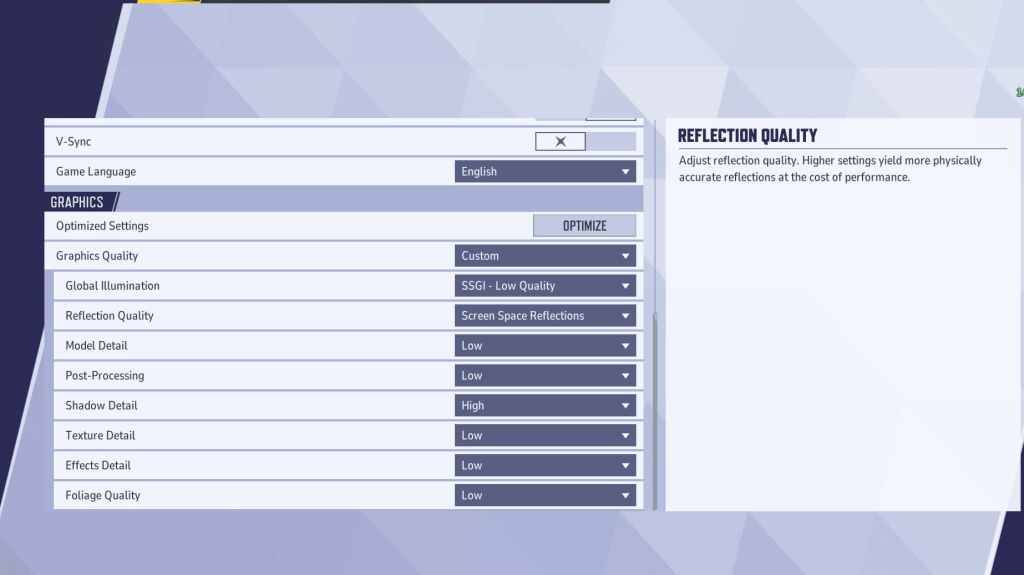
Les paramètres graphiques ont un impact important sur les performances. Donnez la priorité aux performances plutôt qu'à la fidélité visuelle pour un jeu compétitif, en réglant le plus sur Faible pour un gameplay plus fluide et plus réactif. Les PC haut de gamme peuvent expérimenter avec des paramètres Moyen ou Élevé.
| Setting | Description | Best Setting |
|---|---|---|
| Graphics Quality | Preset adjusting multiple visual settings. | Custom |
| Global Illumination | Simulates light bouncing; higher settings are more realistic but demanding. | SSGI – Low Quality |
| Reflection Quality | Clarity and realism of reflections; higher settings enhance detail but impact performance. | Screen Space Reflections |
| Model Detail | Complexity and realism of models; higher settings improve detail but require more power. | Low |
| Post-Processing | Adds visual effects (motion blur, depth of field); reduces frame rates. | Low |
| Shadow Detail | Sharpness and quality of shadows; higher settings are more realistic but demanding. | High |
| Texture Detail | Resolution of in-game textures; higher settings require more VRAM. | Low |
| Effects Detail | Quality of visual effects; lowering reduces visual clutter and boosts performance. | Low |
| Foliage Quality | Density and detail of environmental elements; lower settings improve FPS in outdoor scenes. | Low |
Désactivez l'accélération de la souris dans les paramètres du jeu et de Windows pour améliorer la visée.
Marvel Rivals : paramètres audio optimaux
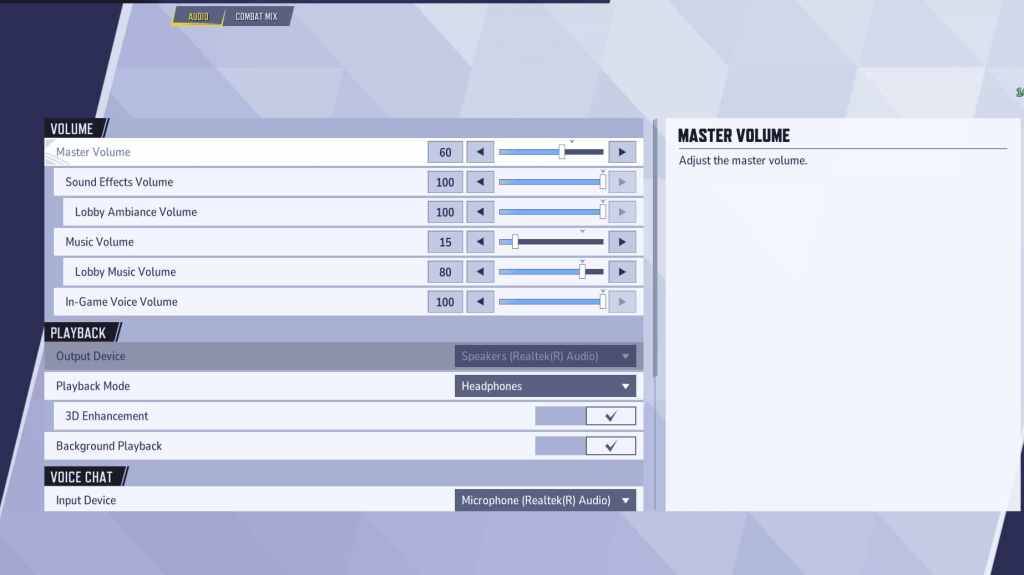
L'audio a un impact significatif sur le gameplay. Activez l'Amélioration 3D pour un son spatial amélioré, aidant ainsi à identifier les mouvements et les capacités de l'ennemi. Utilisez HRTF (si disponible) pour des signaux audio améliorés. Ajustez les niveaux de volume selon vos préférences.
Ce guide complet vous aide à optimiser les paramètres de Marvel Rivals pour des performances optimales et une expérience de jeu améliorée. N'oubliez pas d'expérimenter et de trouver l'équilibre parfait entre fidélité visuelle et réactivité du gameplay.
 Derniers téléchargements
 Downlaod



 Actualité à la Une